





When using MetaTrader trading terminals, you may encounter the “Common error” message. This error indicates a connection issue (the connection may be slow or completely unavailable). If you face it, charts may fail to load, and quotes may appear frozen.
To deal with this error, reconnect to your account. To do this, go to the File tab and click Login to Trade Account. Then, enter your login and password. In the Server field, enter one of the following IP addresses:
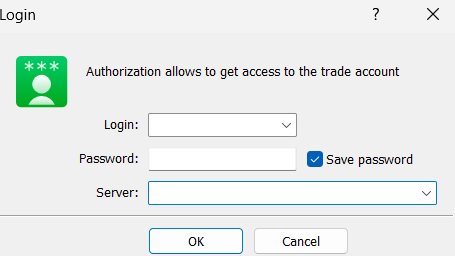
MT4 Live Accounts:
- 46.105.110.68:444
- 85.17.64.45:1960
- 109.234.159.126:1960
- 34.246.250.216:1961
- 18.193.48.40:444
MT4 Demo Accounts:
- 188.165.206.46:444
- 188.124.37.51:1960
- 3.127.25.194:1960
MT5 Live Accounts:
- 85.17.64.45:443
- 85.17.64.45:1950
- 34.246.250.216:443
- 34.246.250.216:1950
- 45.159.113.231:443
- 45.159.113.231:1950
MT5 Demo Accounts:
- 52.18.32.194:443
- 52.18.32.194:1950
- 188.124.37.51:443
- 188.124.37.51:1950
- 51.75.241.104:1950
- 51.75.241.104:443
- 34.247.94.79:1950
- 34.247.94.79:443
If you continue to receive the error message after entering all the IP addresses, please contact customer support.